
What You're Buying
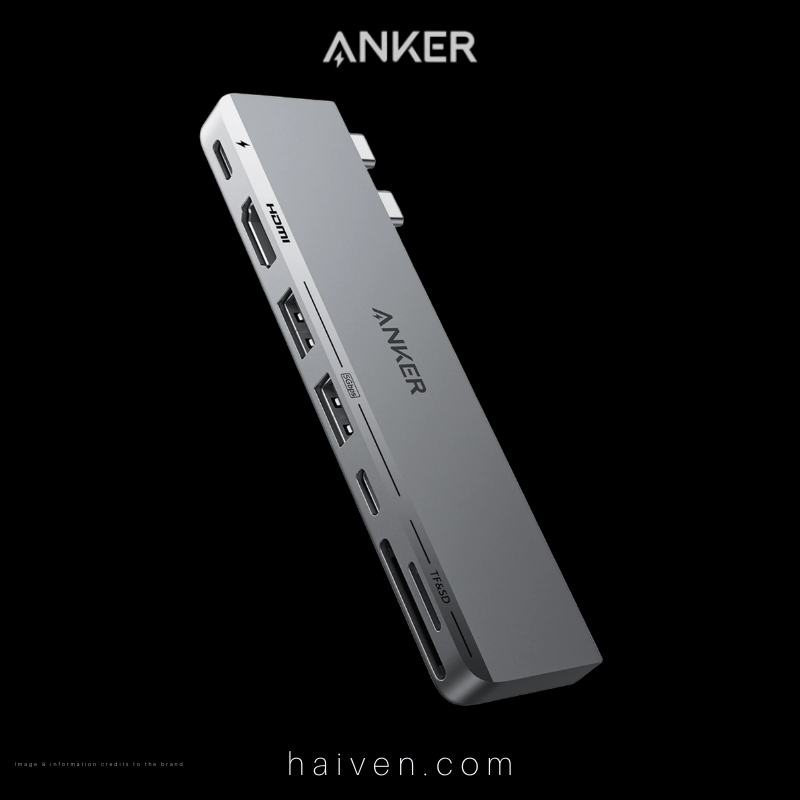
The Anker 547 USB-C Hub (7-in-2, for MacBook) is a slim, gray hub that plugs straight into the two USB-C ports on the side of a compatible MacBook Air or MacBook Pro. Haiven lists it under model number A8354HA1; Anker documents the hub as the A8354. Rather than hanging off a cable, it sits flush against the side of the laptop and turns two ports into seven connections.
According to Anker's specifications, the hub provides:
- One multi-function USB-C port: power delivery input up to 100W, data up to 40Gbps and video output up to 5K (5120 × 2880) at 60Hz
- One HDMI 2.0 port: video output up to 4K (3840 × 2160) at 60Hz, with HDCP 2.2
- Two USB-A ports (USB 3.2 Gen 1): data up to 5Gbps
- One USB-C data port (USB 3.2 Gen 1): data up to 5Gbps
- One SD card slot and one microSD card slot: UHS-I, up to 104MB/s
How It Works
The hub has two USB-C plugs spaced to match the paired ports on a supported MacBook. Once it is pushed in, macOS sees the extra ports with no driver installation; Anker's user guide lists macOS 12 or later as the supported system.
The multi-function USB-C port is the most capable socket, and it does one job at a time. Plug a USB-C charger into it and power passes through to the MacBook. Connect a fast USB-C storage device and it can carry data at up to 40Gbps. Connect a USB-C monitor and it can drive a display at up to 5K at 60Hz. Anker notes that when this port is being used for video, it cannot also pass charge through to the laptop. Because the hub is shaped to leave the MacBook's MagSafe port free, you can still charge the laptop through MagSafe while the multi-function port drives a screen.
The HDMI port works separately and is the simplest way to connect an office monitor, a meeting-room screen or a projector. The two USB-A ports and the second USB-C port handle everyday accessories such as a keyboard, a mouse, a flash drive or an external drive. They are data ports only, so they do not charge the laptop or carry video. The two card slots read SD and microSD cards from cameras, drones and other devices.
Why We Chose It
Recent MacBook Air and 13-inch MacBook Pro models have only a small number of USB-C ports, and many of the accessories people already own still use USB-A, HDMI or memory cards. This hub answers that gap in one small piece of hardware without adding a cable to the desk. It plugs straight in, so it suits people who move between a home desk, a co-working space and client meetings around Dubai and want one accessory to bring their connections with them.
We also chose it because Anker is clear about its limits, which helps buyers decide before they order. The specifications are published openly, the port roles are explained in the user guide, and the compatibility conditions are spelled out rather than left to guesswork.
What Sets It Apart
- A direct fit with no cable. It plugs straight into the side of the MacBook, so there is no loose hub sliding around the desk or tangled in a bag.
- Two video routes. HDMI up to 4K at 60Hz plus the multi-function USB-C port up to 5K at 60Hz give room for an external display setup. On MacBooks with the base M1 or M2 chip, Anker notes that two external screens cannot each show different content, because of how those chips handle displays.
- Both card formats. Separate SD and microSD slots mean no extra card reader is needed for photographers or anyone moving files off a camera.
- Light and pocketable. Anker lists the weight at about 55g, so it adds very little to a laptop sleeve.
Before You Buy: Compatibility
This is a MacBook-specific design. Anker lists compatibility with the 13-inch MacBook Pro and the M1 and M2 MacBook Air, states that it is not designed for other devices, and notes that it cannot be used while a protective case is fitted to the MacBook. If you use a different laptop, a hub with a single cable connection is the better choice. The listed charging and data figures are Anker's maximums. Real speeds depend on the MacBook, the cable and the connected device. A USB-C charger is not included.
Why We Recommend It
For MacBook owners who keep reaching for adapters, the Anker 547 brings HDMI, USB-A, extra USB-C, card reading and pass-through charging together in one tidy unit that stays attached to the laptop. It is well suited to office work, presentations, photo transfers and study, provided your MacBook model is on Anker's compatibility list and you use the laptop without a case. Its clear specifications and practical port mix make it a sensible, honest upgrade for a compact workspace.
View the Anker 547 USB-C Hub 7-in-2 on Haiven.
Reference: Anker 547 USB-C Hub (7-in-2, for MacBook) – Anker; Anker A8354 user guide.