
What It Is
The Creality Ender 3 S1 is a desktop FDM (fused deposition modelling) 3D printer from Creality, the company behind the long-running Ender series. It builds objects layer by layer from 1.75mm plastic filament and has a print volume of 220 × 220 × 270mm, which is enough for most household, workshop and small-business parts. Compared with earlier Ender 3 models, the S1 adds a direct-drive extruder, automatic bed levelling, a dual Z-axis and a flexible magnetic print sheet, so much of the fiddly setup that older budget printers needed is handled for you.
The model in Haiven's catalogue is the standard Ender 3 S1, a new unit in its retail box.
How It Works
An FDM printer melts filament in a heated nozzle and draws each layer of your design onto a heated bed. You prepare the file in slicing software such as Creality Slicer, Cura or PrusaSlicer, which turns a 3D model (STL, OBJ or AMF) into instructions for the printer. You then print from an SD card or over a Type-C USB connection, and control everything from a 4.3-inch colour screen with a rotary knob.
Creality's published specifications include:
- Build volume: 220 × 220 × 270mm
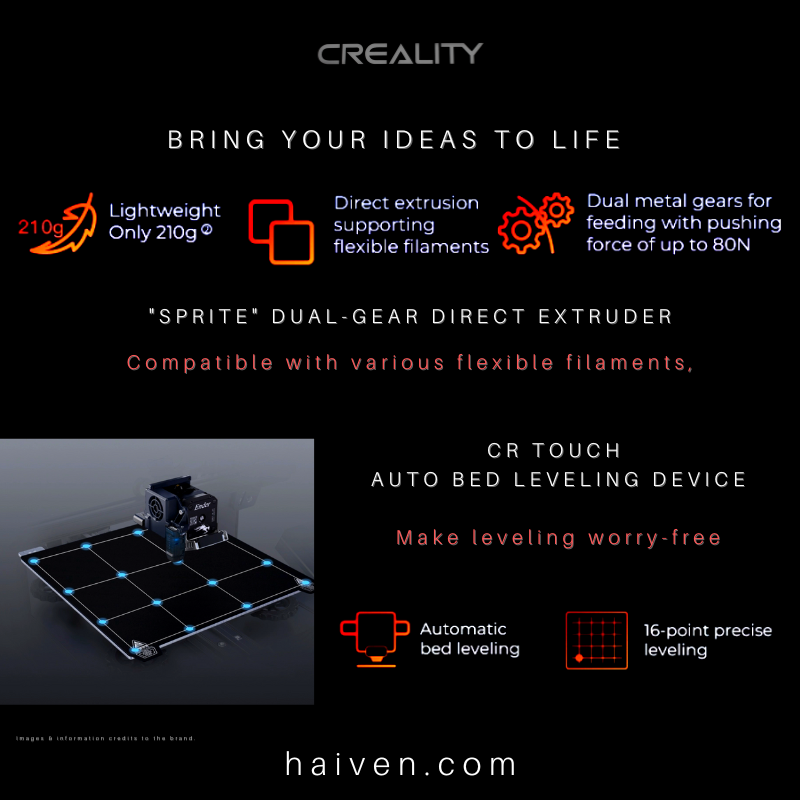
- Extruder: "Sprite" dual-gear direct drive, 1:3.5 gear ratio, up to 80N pushing force
- Nozzle: single 0.4mm nozzle, up to 260°C
- Heated bed: up to 100°C, with a PC-coated spring steel sheet on a magnetic base
- Bed levelling: CR Touch automatic levelling, probing 16 points
- Layer thickness: 0.05–0.35mm, with printing precision of ±0.1mm
- Print speed: up to 150mm/s
- Filaments: PLA, PETG, ABS and TPU, 1.75mm diameter
- Other features: 32-bit silent mainboard, filament run-out sensor and print resume after a power cut
- Machine size and weight: 487 × 453 × 622mm, about 9.1kg
- Power: 350W rated, 115/230V
The "Sprite" extruder sits directly above the nozzle instead of pushing filament through a long tube. That short path gives better control, and it is the main reason the S1 handles flexible filaments such as TPU far more easily than tube-fed (Bowden) printers. The CR Touch probe taps the bed at 16 points before printing and compensates for small differences in height, so the first layer goes down evenly without hours of manual adjustment.
Why We Chose It
3D printing has become a practical tool rather than a hobby gadget. Homes and small businesses in Dubai use it for replacement clips and brackets, cable organisers, plant pots, storage trays, product prototypes and custom fittings that are hard to find in shops. The Ender 3 S1 suits that kind of everyday making. It arrives mostly pre-assembled, it levels itself, and it works with the most common filaments, so a first-time user can move from unboxing to a first print quickly while still having room to grow.
Its 220 × 220mm bed is a sensible middle size: large enough for most useful parts, yet compact enough for a desk or a shelf in a spare room or office.
What Sets It Apart
- Direct drive at this level: the Ender 3 S1 was the first Ender 3 to come with a direct-drive extruder, which makes flexible materials much more manageable.
- Dual Z-axis: two lead screws and two motors lift the gantry evenly on both sides, which helps reduce lines and ridges on the sides of tall prints.
- Easy print removal: once the bed cools, you lift off the spring steel sheet and flex it, and finished parts pop off without scraping.
- Peace of mind on long prints: the filament sensor pauses the job when a spool runs out, and print resume lets you continue after a power interruption.
- Quiet operation: the 32-bit silent mainboard keeps motor noise down, which matters if the printer shares a room with you.
Things to Check Before Buying
Plan space for the full frame and spool holder, which stand about 62cm tall, and keep the printer on a stable surface away from strong air-conditioning drafts, which can affect ABS prints. The maximum nozzle temperature of 260°C covers PLA, PETG, TPU and ABS, but engineering materials that need higher temperatures are outside its range. Check the Z-offset during your first setup, and budget for filament, as it is sold separately from the printer. If you regularly need very large one-piece parts, a larger-format printer may suit you better.
Why We Recommend It
The Creality Ender 3 S1 brings together the features that make 3D printing approachable: a direct-drive extruder, automatic 16-point bed levelling, a dual Z-axis and a flexible magnetic print sheet. For makers, students, designers and small businesses who want a dependable desktop printer for useful, everyday parts, it is a well-rounded and sensible choice.
View the Creality Ender 3 S1 3D printer on Haiven.
Reference: Ender 3 S1 – Creality; Ender-3 S1 specification sheet – Creality; Creality Ender 3 S1 specifications – Tom's Hardware.