
What It Is
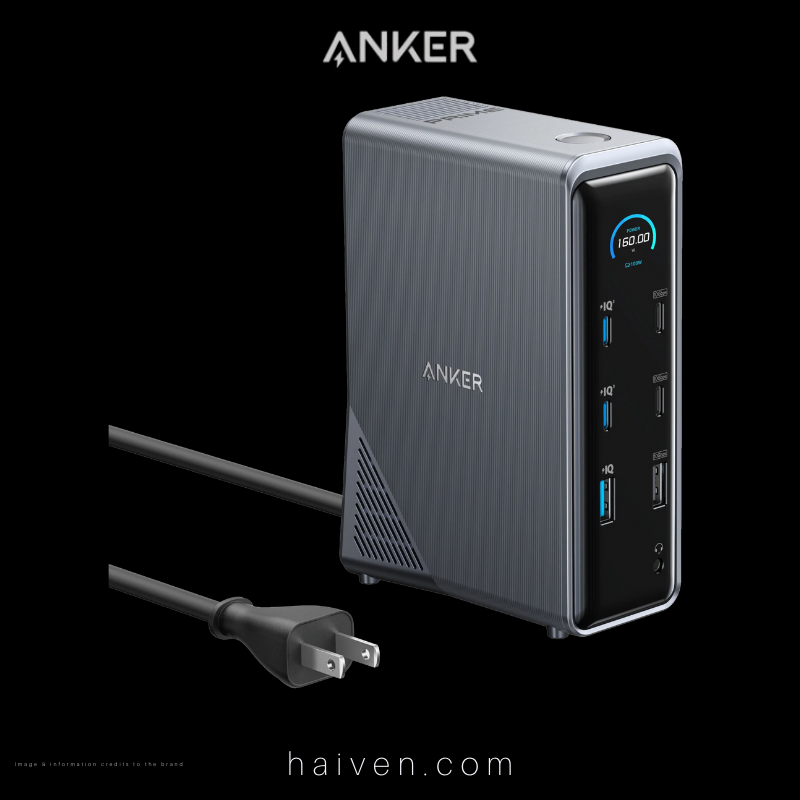
The Anker Prime Charging Docking Station (14-in-1, Dual Display, 160W) is a desktop dock that turns a single USB-C connection from your laptop into a full workstation. Anker's base model number is A83B6, and the version in Haiven's catalogue is the gray A83B62A1, the same model code used by UAE retailers for this dock. It combines a charging station, a USB hub, dual HDMI outputs, wired Ethernet and an audio jack in one upright unit with its own built-in power supply.
It is designed for people who want monitors, keyboard, mouse, storage, network and phone charging to reconnect with one cable.
How It Works
The dock plugs into a wall socket and contains a GaN (gallium nitride) AC-DC power module, which Anker rates at 180W internally, so there is no separate power brick on the desk. Your laptop connects to the dock's USB-C upstream port with the included USB-C cable. Through that one cable the dock sends power to the laptop at up to 100W using USB Power Delivery, and carries data and video back and forth at up to 10Gbps.
From there, the dock shares its ports with everything else on the desk. Anker lists the following:
- Upstream: 1 × USB-C to the laptop, 10Gbps, up to 100W charging
- Display: 2 × HDMI 2.0, up to 4K at 60Hz
- Data: 2 × USB-C at 10Gbps, 1 × USB-A at 10Gbps and 3 × USB-A at 480Mbps
- Charging: 2 × USB-C at up to 100W each and 1 × USB-A at up to 12W
- Network and audio: 1 × Gigabit Ethernet (RJ45) and 1 × 3.5mm audio in/out combo jack
Total USB charging output across all ports is capped at 160W, and the dock shares that power out depending on what is plugged in. For example, Anker's user guide lists up to 160W when the laptop and both front USB-C charging ports are in use, and 157W when all four charging ports are in use. The ports marked "IQ" are charging-only and do not carry data, and the downstream USB-C data ports do not provide charging or video.
The Smart Display
On the front is a small LCD screen. According to Anker, it shows total charging output, the status of each front port, data transfer status, firmware updates and warnings if something is wrong. Pressing the power button switches between the overall output view and the individual port view. Anker also offers a Dock Manager app for your computer that lets you adjust how power is distributed between ports.
Before You Buy: Compatibility
A dock is only as good as its match with your laptop, so these details are worth checking first:
- Your laptop's USB-C port must support video and power. Anker lists compatibility with laptops that support DisplayPort Alt Mode and Power Delivery, including USB4 and Thunderbolt ports, on Windows 10 and 11, ChromeOS and macOS (the user guide lists macOS 12 or later). Anker states it is not compatible with Linux.
- Dual monitors on a Mac show the same image. macOS does not support Multi-Stream Transport (MST), so on a MacBook both external screens mirror each other. On Windows, each monitor can show different content.
- Resolution depends on the laptop. Anker's table shows a single monitor at up to 4K 60Hz on a DisplayPort 1.4 laptop. With two monitors, it lists both at 4K 60Hz only on Windows laptops with DisplayPort 1.4 and DSC compression; otherwise expect both at 2K 60Hz (DP 1.4) or 1080p 60Hz (DP 1.2). Anker notes it does not support 5120 × 1440 super-wide monitors.
- Laptop charging tops out at 100W. Larger laptops with high-power chargers will still charge, but may charge more slowly under heavy load than on their original adapter. Anker also notes this dock cannot charge Lenovo Legion series laptops, though its other functions work.
Why We Chose It
This dock adds ports and charges devices from one box that plugs straight into the wall, which can replace a laptop charger, a phone charger and a separate hub on the desk. Gigabit Ethernet gives a steadier connection for video calls and large uploads than Wi-Fi alone, and two HDMI outputs cover most home-office monitor setups.
What Sets It Apart
Three things stand out. First, the integrated power supply means the dock does not depend on your laptop's charger at all. Second, the two front USB-C ports can each deliver up to 100W, so a tablet or a second laptop can charge quickly alongside the main laptop. Third, the front display makes it easy to see what each port is drawing, which is useful when you are working out why a device charges slowly or whether a monitor is detected.
Why We Recommend It
The Anker Prime 14-in-1 Dock suits professionals, students and home-office users in Dubai who want a clean, one-cable desk setup with strong charging and two external screens. It is the right fit if your laptop supports DisplayPort Alt Mode and Power Delivery over USB-C and you run Windows, ChromeOS or macOS. If you use a Mac and need two different images on two monitors, or you rely on Linux, a different dock will suit you better.
View the Anker Prime Docking Station 14-in-1 Dual Display 160W on Haiven.
Reference: Anker Prime Charging Docking Station (14-in-1, Dual Display, 160W) – Anker; Anker A83B6 user guide.